Convert Product Photos into 3D Models for Shopify & AR
Turn your existing catalog photos into a lightweight 3D model for product pages and AR. Front, back and side shots give the AI the real packaging and shape, not a guess.
- 2 to 4 views
- GLB, OBJ & STL export
- Watertight checks
Start with your main product photo
Free account, starter credits included. GLB output for web and AR.
Supports Multi-Angle Product Photos (up to 15MB)
From product photos to a 3D product page
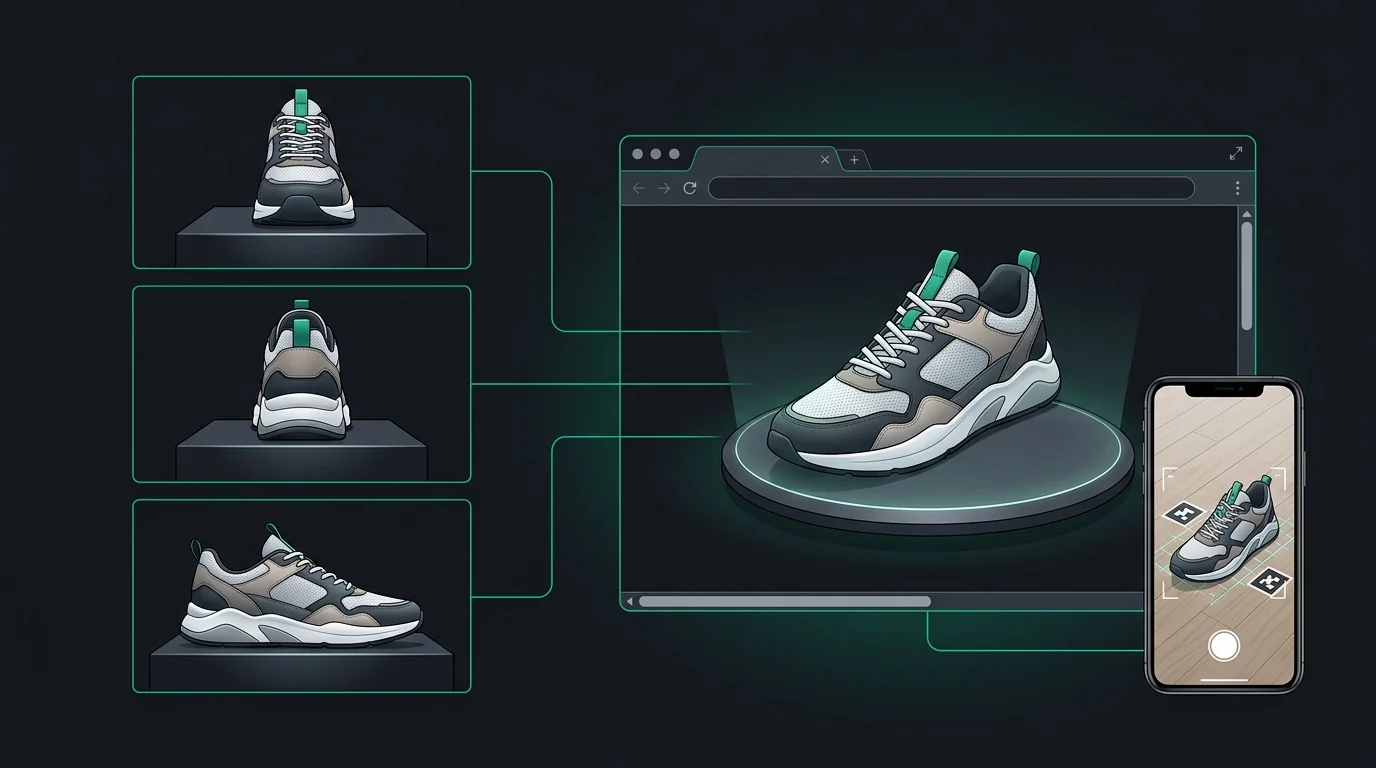
Gather catalog shots
Use clean photos of the product on a plain background: front, back and one or two sides.
Upload your views
Use the front shot as the main image. Rear and side photos help capture labels, ports and contours.
A textured model is built
The AI reconstructs the shape and bakes the surface appearance into a single textured model.
Download and publish
Export GLB and add it to your store, a model-viewer embed, or an AR preview.
Shots that work best for products
Catalog photography you already have is often enough. What matters is that the shots are consistent.
Straight on, label and branding fully visible and sharp.
Ingredients, barcodes, ports or back design, shot square-on.
Shows thickness and profile. Helps scale and proportion.
Useful for complex shapes like shoes, bottles with handles or bags.
Product Photography Guidelines for Clean 3D Assets
Clean White or Neutral Backdrop
Shoot products on a solid white poster board or lightbox to enable clean, artifact-free AI background segmentation.
Diffuse, Glare-Free Lighting
Use soft daylight or frosted LED panels to avoid hot specular flash reflections on glossy packaging and labels.
Include Critical Rear Labels
Provide a clear, straight-on rear photo so the AI captures packaging text, barcodes, and certification emblems accurately.
Keep Product Stationary
Rotate the camera around the stationary product rather than moving the item, maintaining uniform perspective heights.
Why product 3D needs more than one photo
Shoppers inspect a 3D product closely. They rotate it, zoom into the label and check the back. A model built from one photo has to invent that rear surface, which is where mistakes show up most: wrong text, missing ports or the wrong shape.
Supplying rear and side photos lets the model follow what the product really looks like, which generally makes the result more trustworthy on a product page. Third-party studies report that interactive 3D and AR can improve engagement and reduce returns for some product categories, but results vary by store and category, so treat it as something to test rather than a guarantee.
Photo quality still sets the ceiling. Even light, a clean background and no reflections on glossy packaging give the best starting point.
Single product photo vs a multi-angle set
| What you compare | Single photo | Multiple views |
|---|---|---|
| Rear label and barcode | Often guessed | Can follow the rear photo |
| Product thickness and profile | Estimated from the front | Informed by side views |
| Glossy and reflective surfaces | Harder to read | More cues to work with |
| Shoot time | One shot | A few shots you may already have |
| Best for | Quick previews | Product pages, AR and catalog assets |
Using the 3D model in your store
A few practical notes for getting the model live.
Adding GLB to Shopify
Shopify supports 3D models as product media in GLB format. Check Shopify's current model requirements for file size and polygon guidance before uploading, and keep models lightweight for mobile.
Embedding anywhere with model-viewer
Google's open-source model-viewer web component lets you embed a GLB with rotation, zoom and an AR button in a few lines of HTML, on any site or landing page.
AR on iOS and Android
GLB works with Android's Scene Viewer. iOS uses USDZ in AR Quick Look, which some platforms generate for you from GLB. Test the AR button on both platforms before launch.
Keeping product accuracy
Always compare the finished model against the real product, especially labels, colors and proportions. Treat the 3D model as a visual asset, not a precision measurement.
Where are E-Commerce 3D Models Used?
Shopify 3D Product Media
Upload lightweight GLB assets directly into Shopify product media galleries to enable 360-degree interactive customer spin.
Mobile Augmented Reality (AR Try-On)
Let shoppers preview a product in their room with AR on iOS and Android. Generated models use arbitrary units, so set and check real-world size separately.
Interactive WebGL Embeds & Ad Creatives
Embed 3D products in landing pages with the Google model-viewer component to add rotation, zoom and an AR button.
Digital Catalog Prototyping
Quickly digitize physical inventory into 3D assets before organizing expensive studio photo sessions.
Platform & Viewer Compatibility
Shopify Admin 3D Media
Upload a .glb file as product media. Check Shopify's current 3D model requirements for file size and polygon guidance first.
Google <model-viewer>
Single-line HTML web embedding with auto-rotation, gesture controls, and AR launch buttons.
Blender & Three.js
Import PBR-textured GLB and OBJ geometry for commercial rendering or custom WebGL configurator scenes.
Related guides
Frequently asked questions
Ready to build your model?
Create a free account, upload your best photo and export a 3D model in GLB, OBJ or STL.
Get Started