
AI Generated 3D Models for Online Stores
An objective merchant guide on what multi-view AI 3D generation can produce today, which product categories are suitable, and verified file requirements across Shopify, Amazon, Google, and WooCommerce.
What AI 3D Generation Does for Online Stores
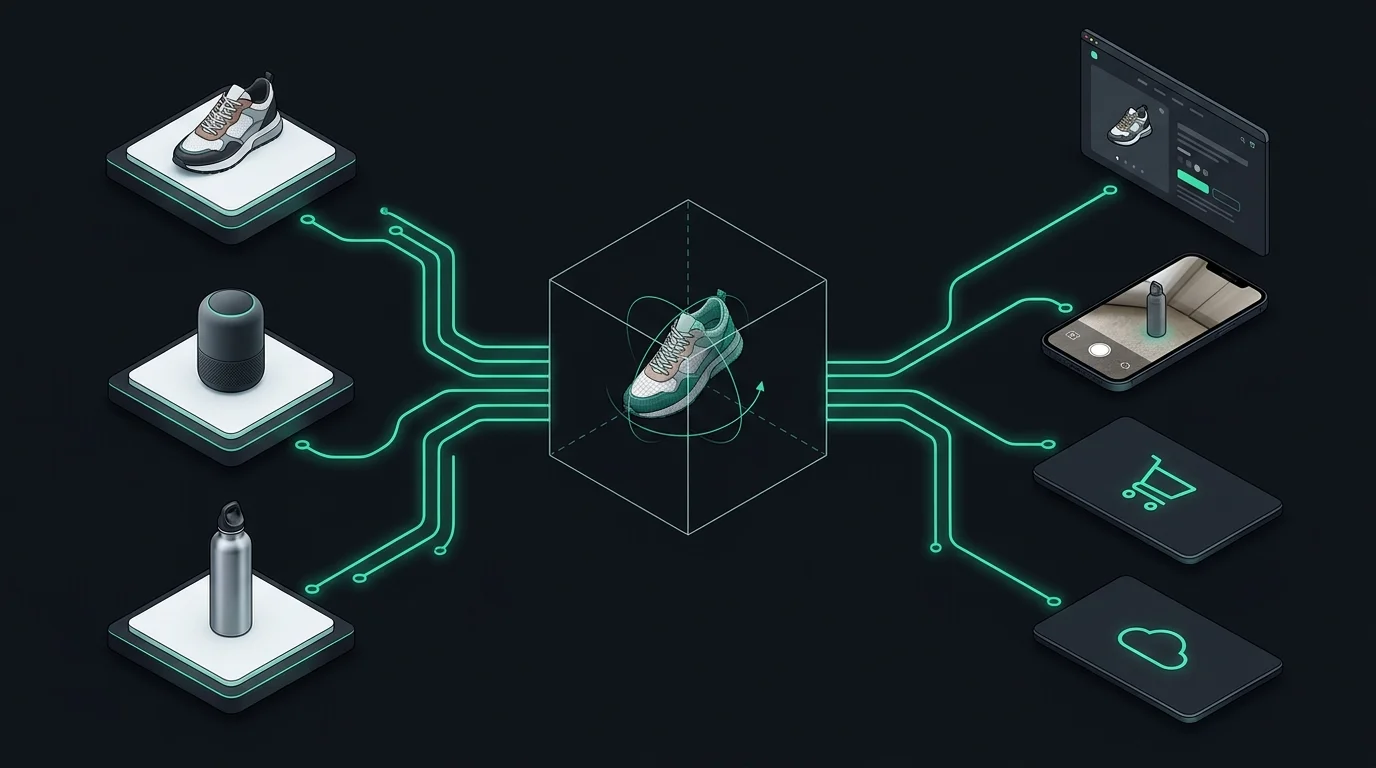
Multi-view neural reconstruction takes 2 to 4 clean photos of a physical product taken from different angles (Front, Back, and side profiles) and correlates surface contours, feature points, and silhouettes.
Instead of manually plotting polygons in Blender or CAD, the AI reconstructs a watertight 3D polygonal shell and bakes Physically Based Rendering (PBR) texture maps (Base Color, Roughness, Normal) directly into an industry-standard GLB binary container.
Important distinction: AI models generate visual marketing assets designed for WebGL interactive viewing and mobile AR inspection. They are not dimensioned engineering CAD models with tolerance specifications.
Is Your Product a Good Fit for AI 3D?
Before investing time in photography, evaluate which SKUs in your catalog produce clean geometry and which should be avoided.
High-Success Categories (Rigid & Structured)
- Footwear & Sneakers: Well-defined outsoles, structured uppers, and distinct side/heel silhouettes reconstruct with high geometric accuracy.
- Packaged Goods & Bottles: Cosmetics, jars, boxed goods, and cylindrical containers with clear labels and opaque surfaces.
- Consumer Hardware & Accessories: Electronics, power banks, headphones, bags, and hard goods with stable geometry.
- Toys & Collectibles: Solid figurines, sculpted tabletop miniatures, and molded plastic items.
Challenging Categories (Avoid AI for Now)
- Transparent Glass & Liquids: Clear perfume bottles, glassware, and fluid levels refract light, confusing neural depth estimation.
- Mirrors & High-Gloss Chrome: Highly reflective surfaces bounce camera reflections that the AI misreads as surface topography.
- Flowing Apparel & Drapes: Loose dresses, thin silk shirts, and hanging textiles deform easily and lack rigid structure without an internal mannequin.
- Fine Wire Meshes & Fur: Delicate jewelry chains, thin netting, or high-pile faux fur exceed standard web polycount budgets.
3D Sourcing Routes Compared: Freelancers, 3D Scans, or AI?
Merchants have three primary options for creating 3D product models. Choose the method that matches your SKU volume and accuracy requirements.
| Evaluation Factor | Manual 3D Artist / Studio | LiDAR / Mobile Scanning App | Multi-View AI Generation |
|---|---|---|---|
| Required Input | CAD blueprints, physical sample, or dimensioned reference sheets | Physical item placed on a turntable in specialized lighting | 2 to 4 existing catalog photos (Front, Back, Side) |
| Turnaround Time | 3 to 14 business days per SKU | 15–30 minutes scanning + manual mesh retopology | Under 2 minutes per SKU automated synthesis |
| Measurement Precision | Millimeter-accurate if built from engineering CAD | High spatial scale accuracy; soft texture alignment | Proportional visual accuracy suitable for web inspection |
| Best Used For | Hero catalog flagships, complex mechanical assemblies, custom configurators | One-off vintage goods, artisan ceramics, physical retail inventory | Rapid catalog rollout across footwear, packaged goods, tech accessories |
3D File Requirements Across Major E-Commerce Channels
Technical specifications extracted directly from official platform documentation. All channels standardize on binary glTF (.glb) for web rendering.
- Required Format:
.glb(Shopify automatically creates USDZ for iOS AR Quick Look). - File Size: Hard cap at 500 MB; files over 15 MB are auto-optimized. Official recommendation is under 5 MB for mobile speed.
- Upload Method: Direct upload in Shopify Admin $\rightarrow$ Products $\rightarrow$ Media.
- Required Format:
.glbor.gltf. - File Size: Hard limit of 5 MB max.
- Polycount: Maximum 200,000 triangles.
- Eligibility: Brand Registry required. Submitted via Image Manager $\rightarrow$ 3D Models tab.
- Required Format:
.glbor.gltf. - File Size: Maximum 15 MB.
- Feed Attribute: Supplied via the
virtual_model_linkproduct attribute in your feed. - Display: Enables "View in 3D" and AR buttons directly on Google Search snippets.
- Required Format:
.glbcontainer. - Embed Method: Google's open-source
<model-viewer>custom element or standard WooCommerce 3D viewer plugins. - AR Support: Built-in attributes for Android Scene Viewer and iOS Quick Look.
The One-Product Workflow: From Photos to Live Store 3D
Follow this 4-step loop to test 3D media on a single pilot SKU before digitizing larger catalog collections.
Pick a Pilot SKU
Choose a rigid, opaque product with existing studio photography (e.g. best-selling shoe or boxed cosmetic).
Export 3 Angles
Ensure you have clean Front, Back, and Side angles shot at consistent scale on a plain background.
Generate GLB
Use our dedicated converter to synthesize the 360° geometry and bake PBR textures.
Publish to Channel
Upload the resulting <5MB GLB file directly into your store's product media gallery.
Ready to convert photos of a product?
Open the specialized Multi-Angle Product Photos to 3D converter to upload your shots and download a Shopify and Amazon compliant GLB file.
Current Limits of AI 3D Generation
Transparent technical boundaries to keep in mind when evaluating generative 3D pipelines for e-commerce catalogs.
Subject Scale Dependency
If input photos have mismatched camera heights or varying zoom levels, reconstructed meshes may exhibit slight proportion distortion along the transition edges.
Complex Specular Reflections
Mirrored chrome and shiny metallic finishes require even, diffused studio lighting. Harsh point-light reflections can be miscalculated as physical surface geometry.
Manual Quality Verification
Always review the generated GLB in a standard WebGL viewer before publishing live to customer-facing channels, especially around fine text labels and branding.
Frequently Asked Questions
Common questions regarding commercial rights, file compatibility, and catalog workflows.