AI 3D Base Meshes from Concept Art
An architectural guide for indie game developers on accelerating 3D asset blockouts: turn 2D character turnarounds and environmental concept sketches into clean base meshes for Blender sculpting, auto-rigging, and game engine staging.
Bypassing the Manual Blockout Bottleneck
In traditional indie game production, turning approved 2D character sheets or environmental props into 3D assets takes 8 to 24 hours of manual box-modeling simply to block out the basic proportions and silhouette.
Multi-view neural reconstruction shifts this workload. By feeding clean concept art (orthographic front, side, and rear views) into a generative volumetric pipeline, technical artists obtain a watertight 3D base mesh with baked PBR materials in under 2 minutes.
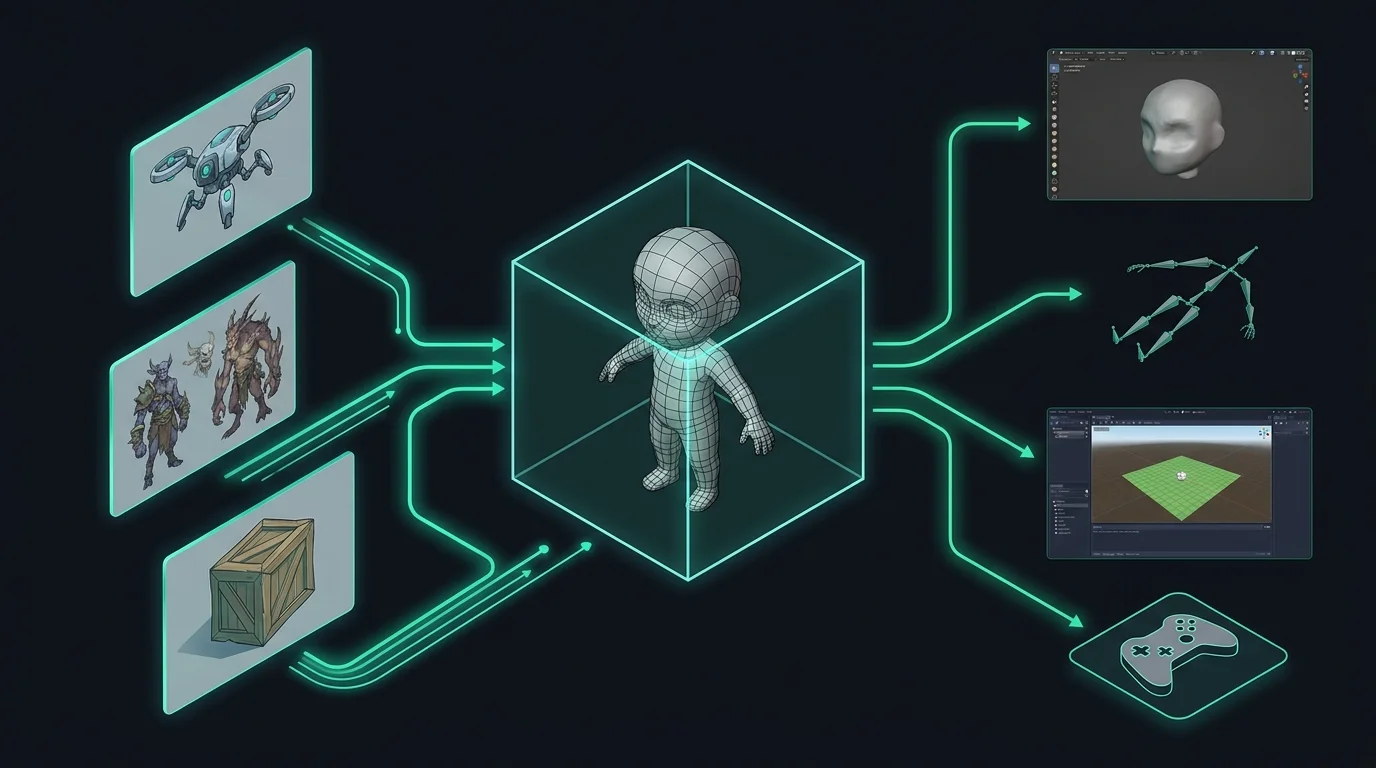
The Hybrid 5-Stage Asset Pipeline
How modern indie studios integrate multi-view AI generation with standard DCC tools and engine compilers.
Concept Turnaround
Photoshop, Krita, ProcreateArtist draws orthographic front, side, and rear turnaround views in a neutral A-pose at matching scale and baseline.
Base Mesh Synthesis
Voxelvia3D Multi-ViewMulti-angle neural engine reconstructs 3D volumetric geometry and bakes PBR texture maps (Base Color, Normal).
Blender Refinement
Blender 4.x / ZBrushArtist sculpts fine anatomical details, inspects edge loops, and optimizes vertex counts to the target game budget.
Auto-Rigging
Mixamo / AccuRigAutomated bipedal skeleton placement, weight painting calibration, and previewing test idle/walk locomotion clips.
Engine Staging
Godot 4, Unity, UnrealDirect import via GLB or FBX container with prefabricated materials, collider physics, and state machine hooks.
Polygon Count & Texture Target Budgets
Recommended polygon allocation and material channel standards based on game asset classification.
| Asset Tier | Target Triangles | Texture Resolution | Decimation Route | Ideal AI Generation Fit |
|---|---|---|---|---|
| Background Environment Props | 1,500 – 5,000 | 1024×1024 (1K) | Automated Decimate Modifier | Crates, barrels, rocks, lanterns, signage |
| Secondary NPCs & Enemies | 8,000 – 20,000 | 2048×2048 (2K) | Quad Remesh / Instant Meshes | Guards, fantasy beasts, droids, crowd units |
| Hero Characters (Player Model) | 25,000 – 60,000 | 2048×2048 to 4K | Manual Retopology over AI Base | Used for rapid silhouette and volume blocking |
| Modular Building Kits | 3,000 – 12,000 | 2048×2048 (2K) | Grid Snapping & Edge Beveling | Ruins, archways, wall sections, furniture |
Engine & DCC Tool Compatibility
Verified export formats, import workflows, and engine-specific best practices.
Godot 4.x
Native GLBDrag-and-drop the generated .glb file directly into your Godot FileSystem. Automatically maps Base Color and Normal textures into StandardMaterial3D.
Unity (URP & HDRP)
glTFast / FBXImport GLB assets using Unity's official glTFast package, or export from Blender as an FBX with standard Lit shader material bindings.
Unreal Engine 5
OBJ / FBX / NaniteImport OBJ meshes directly into the Content Browser. Dense AI base meshes can be previewed instantly with Nanite virtualization before retopology.
Blender 4.x
GLB / OBJ ImportFull Principled BSDF material setup imports intact. Use Blender's Remesh modifier, QuadriFlow, or Shrinkwrap retopology over the generated base mesh.
Adobe Mixamo
Auto-Biped RigUpload the character mesh in OBJ format with textures. Place chin, wrists, elbows, and knees markers for instant auto-rigging into standard animation libraries.
ActorCore AccuRig
Finger RiggingAlternative free auto-rigging tool providing precise 5-finger bone mapping and multi-pose skinning calibration for humanoid characters.
Ready to generate a base mesh from your character sheet?
Open the specialized Character Sheet to 3D converter to upload your orthographic front, side, and rear turnaround views and download game-ready GLB and OBJ files.
Frequently Asked Questions for Game Developers
Technical specifications, topology considerations, licensing, and auto-rigging workflows.