Convert Camera Photos & Real Objects to 3D Models with AI
Transform smartphone photos, product pictures, and real-world objects into high-fidelity 3D assets for e-commerce, AR, and 3D printing without complex photogrammetry.
Supports Camera Photo (up to 15MB)
Automated 2D to 3D AI Pipeline
From raw Camera Photo upload to production-ready 3D Model mesh in seconds
Upload your 2D Camera Photo image to Voxelvia3D's secure dashboard.
Our AI separates the background and performs neural 3D mesh reconstruction.
Adjust polycount decimation (low, medium, high poly density) and PBR materials.
Download your compiled, optimized 3D Model model instantly.
Single-Photo AI 3D Reconstruction vs. Photogrammetry
Traditional photogrammetry requires capturing 50 to 100 overlapping camera shots from multiple angles, combined with precise studio markers and heavy computational processing. Voxelvia3D's camera photo AI revolutionizes this workflow by inferring full 360-degree volumetric geometry and unseen back surface angles from a single photograph.
The neural network automatically separates the physical object from background clutter, normalizes directional studio lighting, and generates clean Albedo color textures alongside Normal and Roughness displacement maps for real-time PBR rendering.
Converted photo models compile into GLB (for Shopify, WebGL & mobile AR), OBJ with .MTL textures (for digital editing in Blender), and STL (for 3D printing physical keepsakes). If you are converting 2D digital illustrations or concept drawings instead, use our [AI Image to 3D Converter](/tools/image-to-3d).
Workflows, Guidelines & Integrations
Explore recommended settings, production applications, and compatible software
Photograph physical subjects under soft, indirect daylight to prevent harsh directional shadows and hot flash reflections from distorting texture maps.
Capture the entire object or product within the frame without cropping edges or obscuring key surface contours.
Use clear, focused smartphone or camera shots with minimal noise to allow neural vision encoders to extract precise geometry.
Position physical items against a neutral or contrasting background to assist automated AI foreground segmentation.
What You Can Build With Camera Photo to 3D Model
Explore real-world workflows engineered for watertight slicing, Bambu AMS multi-color printing, and custom collectibles.
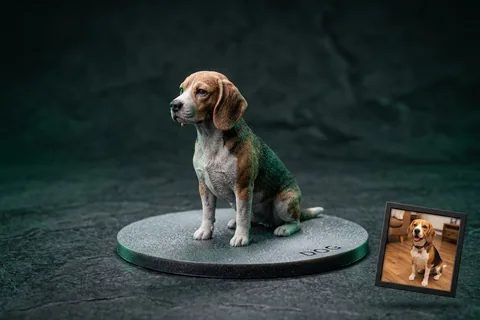
Photo to 3D Figurine
MiniaturesConvert portrait and pet photos into watertight miniature figurines with integrated flat bed-adhesion baseplates.
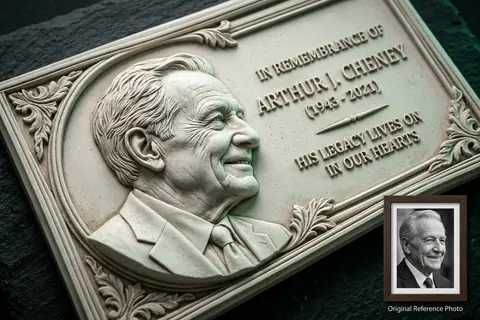
Photo to 3D Relief
Bas-ReliefConvert high-contrast photos into sculpted bas-relief wall art, lithophanes, and commemorative plaques.
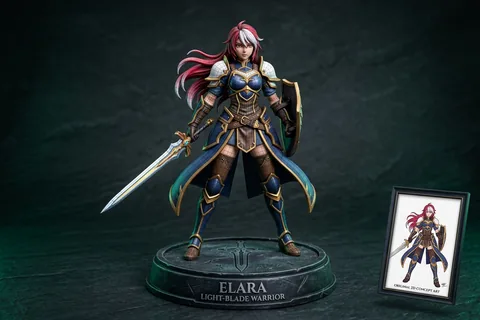
2D Character to 3D
Anime & OCTransform 2D anime drawings and original character concept art into printable quad-mesh collectibles.
Explore Related 3D AI Converters
Frequently Asked Questions
Everything you need to know about Camera Photo to 3D Model AI conversion.
Start Converting Camera Photo to 3D Model
Test AI quality with verified showcase models for free, or get credits to convert your own custom Camera Photo files into watertight 3D models.
Get Started Now