Convert Character Sheets & Turnarounds into 3D Game Assets
Start from your front, side and back character views and get a textured 3D base mesh you can clean up in Blender, rig and bring into your game engine.
- 2 to 4 views
- GLB, OBJ & STL export
- Watertight checks
Start with your front view
Free account, starter credits included. GLB and OBJ for game engines.
Supports Character Turnaround Sheet (Front / Side / Back) (up to 15MB)
From character sheet to game-ready base mesh
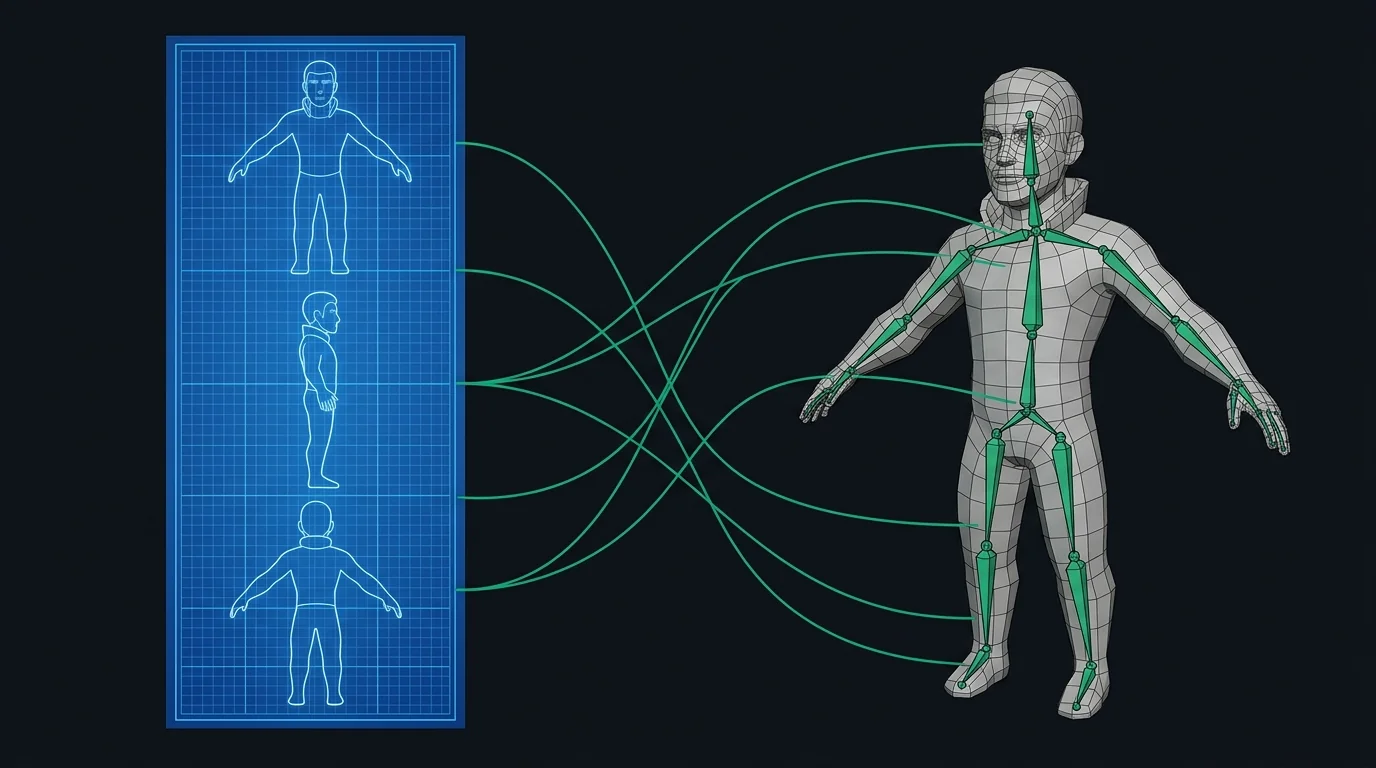
Prepare the turnaround
Export front, side and back as separate images at the same scale, in a relaxed A-pose or T-pose.
Upload the views
Use the front view as the main image. Side and back views give the AI the profile and rear it would otherwise guess.
A base mesh is generated
The AI builds a textured 3D character from the combined views as a starting point.
Clean up and rig
Export GLB or OBJ, refine topology in Blender, then rig and import into Godot, Unity or Unreal.
What a good turnaround sheet contains
Orthographic views drawn at the same scale give the cleanest signal. Perspective drawings and mismatched heights cause distortion.
Straight on, arms slightly away from the body, feet apart.
Exact 90° view. Same height and ground line as the front.
Hair, cape, backpack and armor at the rear, drawn clearly.
Extra reference for volume, clothing folds and accessories.
How to Prepare Your Character Sheet for Best 3D Results
Use A-Pose or T-Pose (Arms Away From Body)
Characters with arms slightly extended—not pressed against the torso—allow the AI to read limb geometry cleanly. Crossed arms or overlapping limbs confuse depth estimation.
Align Front, Side, and Back at the Same Height
Make sure the ground line and head top are at identical pixel heights across all three views. Misaligned views produce distorted proportions in the reconstructed 3D mesh.
Remove Backgrounds Before Upload
Use a transparent PNG background or solid neutral grey behind your character. Mixed or textured backgrounds fragment the foreground segmentation step.
Consistent Lighting / Flat Colors Work Best
Flat-shaded or cell-shaded character sheets reconstruct more cleanly than fully rendered concept art with dramatic shadows, since strong shadows are misread as surface depth.
Why a turnaround beats a single concept image
A single front-facing illustration leaves the model to imagine the character's profile, back hair and rear gear. That is where concept art most often loses its design: thin silhouettes become bulky, back details disappear and proportions drift.
A proper turnaround gives the reconstruction real information for every side. When the views line up, the result tends to keep your proportions and design details much better, giving you a stronger starting point to sculpt and retopologize.
Treat the output as a base mesh, not a finished game asset. AI meshes usually need topology cleanup, UV checks and rigging before they are production-ready.
Single concept image vs turnaround sheet
| What you compare | Single photo | Multiple views |
|---|---|---|
| Character profile | Guessed from the front | Follows the side view |
| Back hair, capes and gear | Often invented | Can follow the back view |
| Proportions | May drift | Easier to keep consistent |
| Prep work | None | Align views at the same scale |
| Best for | Quick exploration | Characters you plan to rig and animate |
From mesh to game engine
A typical indie pipeline once you have the base mesh.
A-pose vs T-pose
A-pose, with arms about 45° from the body, usually deforms shoulders more naturally when rigged. T-pose is simpler for some tools. Keep the same pose in every view either way.
Retopology in Blender
AI meshes are dense and triangulated. Retopologize or decimate to your target polygon budget, then check UVs and normals before rigging.
Rigging
Mixamo and AccuRig can auto-rig humanoid characters. Mixamo accepts FBX or OBJ, so export OBJ, or convert GLB to FBX in Blender first.
Importing into your engine
Godot 4 imports GLB natively. Unity can import glTF/GLB with the glTFast package. Unreal Engine has glTF import options, or you can bring in an FBX exported from Blender.
Who Uses Character Sheet to 3D Conversion?
Indie Game Developers (Unity, Unreal, Godot)
Generate a textured GLB base mesh from concept turnarounds, clean it up in Blender, auto-rig with Mixamo or AccuRig, and import it into your game engine.
Character Concept Artists & Illustrators
Validate that orthographic character proportions read correctly in 3D before handing off assets to a modeler—catching perspective errors early in the design phase.
Tabletop Miniature Designers
Convert original character art into watertight STL figurines for FDM or resin 3D printing, with full manifold verification for clean, bed-adhesion-safe geometry.
VTuber & Virtual Avatar Creators
Generate a rough 3D base mesh from 2D VTuber character designs to use as a starting point for sculpting in Blender or rigging in VRoid Studio.
Game Engine & Software Compatibility
Godot 4 / Unity / Unreal Engine
GLB (glTF 2.0) exports import natively into Godot 4, via Unity's glTFast package, and as FBX-equivalent into Unreal Engine with full PBR material preservation.
Blender & ZBrush
Import OBJ or GLB base meshes into Blender for retopology, sculpting detail passes, or pose adjustments before final game export.
Mixamo & AccuRig
Export OBJ (or convert GLB to FBX in Blender) and use Mixamo or AccuRig for auto-rigging of humanoid characters, then apply walk, run and idle animation clips.
Related guides
Frequently asked questions
Ready to build your model?
Create a free account, upload your best photo and export a 3D model in GLB, OBJ or STL.
Get Started