Convert Camera JPEG Photos to 3D OBJ Meshes Free
Turn real-world camera photos and physical objects into sculptable 3D OBJ meshes with paired MTL materials for ZBrush and Blender.
Supports JPEG (up to 15MB)
Automated 2D to 3D AI Pipeline
From raw JPEG upload to production-ready OBJ mesh in seconds
Upload your 2D JPEG image to Voxelvia3D's secure dashboard.
Our AI separates the background and performs neural 3D mesh reconstruction.
Adjust polycount decimation (low, medium, high poly density) and PBR materials.
Download your compiled, optimized OBJ model instantly.
Physical Object Digitization: Converting Camera JPEGs to Sculptable Base Meshes
Digital camera and smartphone JPEG photographs capture complex organic surfaces. Voxelvia3D synthesizes full 3D Wavefront OBJ geometry from single camera captures, calculating spatial vertex coordinates (`v`), UV texture coordinates (`vt`), and vertex normal vectors (`vn`).
The output package includes the `.obj` geometry alongside a companion `.mtl` material file and high-resolution Albedo/Normal PNG maps, providing digital sculptors with an immediate volumetric base mesh for ZBrush DynaMesh or Blender Multires sculpting.
Workflows, Guidelines & Integrations
Explore recommended settings, production applications, and compatible software
Use balanced ambient light so the AI can discern back contours and side silhouettes accurately.
Import the OBJ into ZBrush and apply DynaMesh at 256 or 512 resolution to establish uniform sculpting topology.
Keep the .obj and .mtl files in the same project directory to ensure automatic texture linking in 3D viewports.
Apply a quick Remesh modifier in Blender before sculpting to convert triangulated faces into sculptable quads.
What You Can Build With JPEG to OBJ
Explore real-world workflows engineered for watertight slicing, Bambu AMS multi-color printing, and custom collectibles.
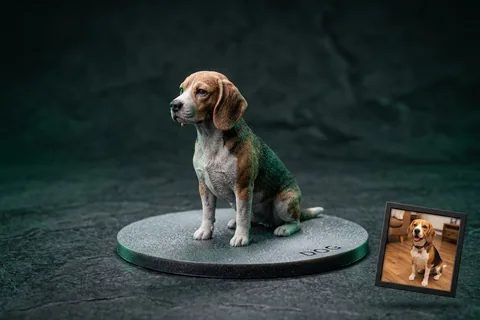
Photo to 3D Figurine
MiniaturesConvert portrait and pet photos into watertight miniature figurines with integrated flat bed-adhesion baseplates.
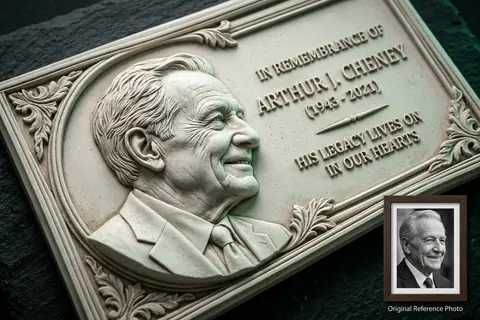
Photo to 3D Relief
Bas-ReliefConvert high-contrast photos into sculpted bas-relief wall art, lithophanes, and commemorative plaques.
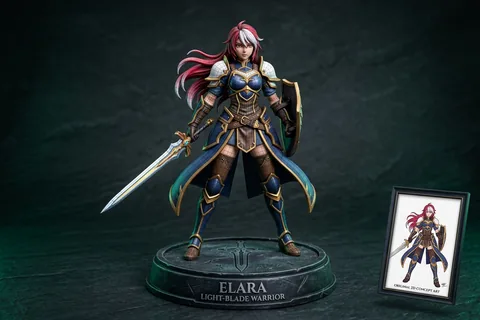
2D Character to 3D
Anime & OCTransform 2D anime drawings and original character concept art into printable quad-mesh collectibles.
Explore Related 3D AI Converters
Frequently Asked Questions
Everything you need to know about JPEG to OBJ AI conversion.
Start Converting JPEG to OBJ
Test AI quality with verified showcase models for free, or get credits to convert your own custom JPEG files into watertight 3D models.
Get Started Now